
Connecting payment with PayPal
To accept payments via PayPal in pickAtime, follow the steps below.
Note: You must have a PayPal Business or Business-PRO account to proceed.
Instructions for Setting Up PayPal (REST API):
- Log in to PayPal using your Business account.
- Navigate to the PayPal Developer Dashboard.
- Switch to Live Mode (not Sandbox), and open the "Apps & Credentials" tab.
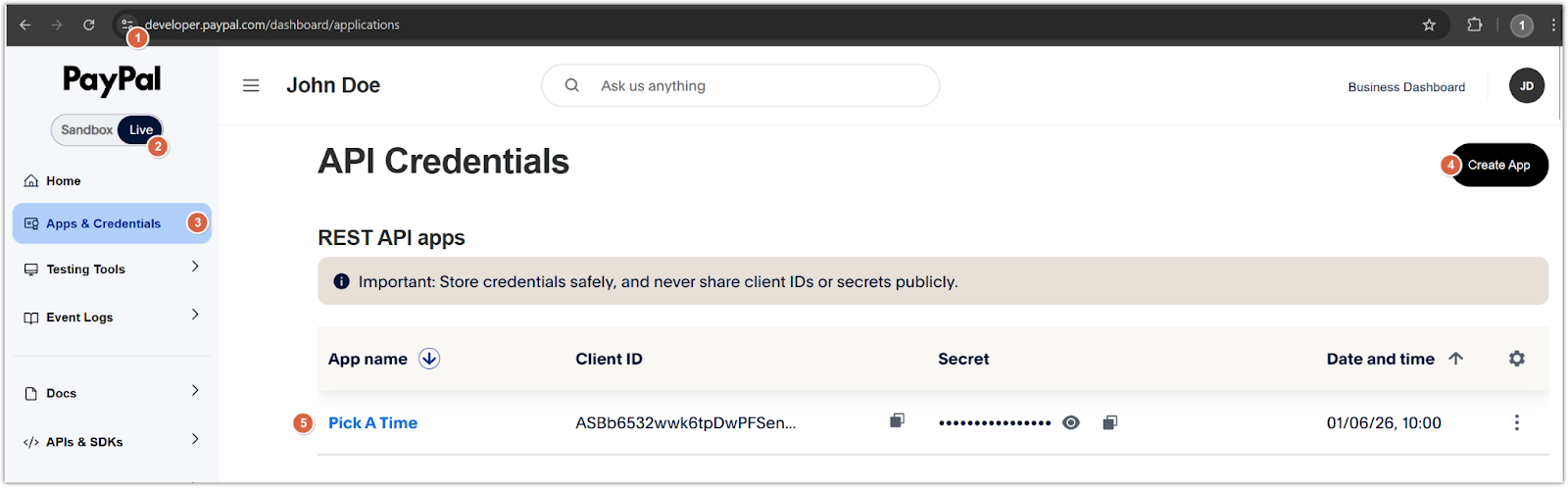
- Create a new Merchant application:
- Click Create App.
- Give your application a name.
- Once created, you will see a Client ID and Secret.
- Copy both values.
- Configure pickAtime:
- In pickAtime, go to Admin UI / Settings / Credit Card Setup.
- From the drop-down menu, select PayPal (REST API).
- Paste the Client ID and Secret into the corresponding fields.
- Click the "Check Credentials" button.
- If successful, your PayPal integration is now active.
You are now ready to begin accepting payments via PayPal through your pickAtime scheduling system.